Complete Services for Tax Professionals

Service Bureau tools for tax pros: Manage and grow your offices

Refundo offers all of the service bureau solutions you need to empower your business and engage your clients.
Get Started
Here’s what our Service Bureau Dashboard Kit can do

Make moves with solid data and greater control

Maximize Your Revenue with Fee Splitting

Take full control of how revenue flows across your offices. Set custom fee splits by percentage or dollar amount for each sub-office, ensuring every location is optimized for profitability.

Purple checkmark icon used for bullet points on the website.
Flexible structures: Split fees by percentage or fixed dollar amount, whatever works best for your business.
Purple checkmark icon used for bullet points on the website.
Office-by-office control: Customize fee structures for each sub-office to match their performance and market.
Purple checkmark icon used for bullet points on the website.
Real-time visibility: See exactly how revenue is distributed across your entire operation.
Fee split adjustment interface for sub-offices, allowing percentage or dollar-based customizations.
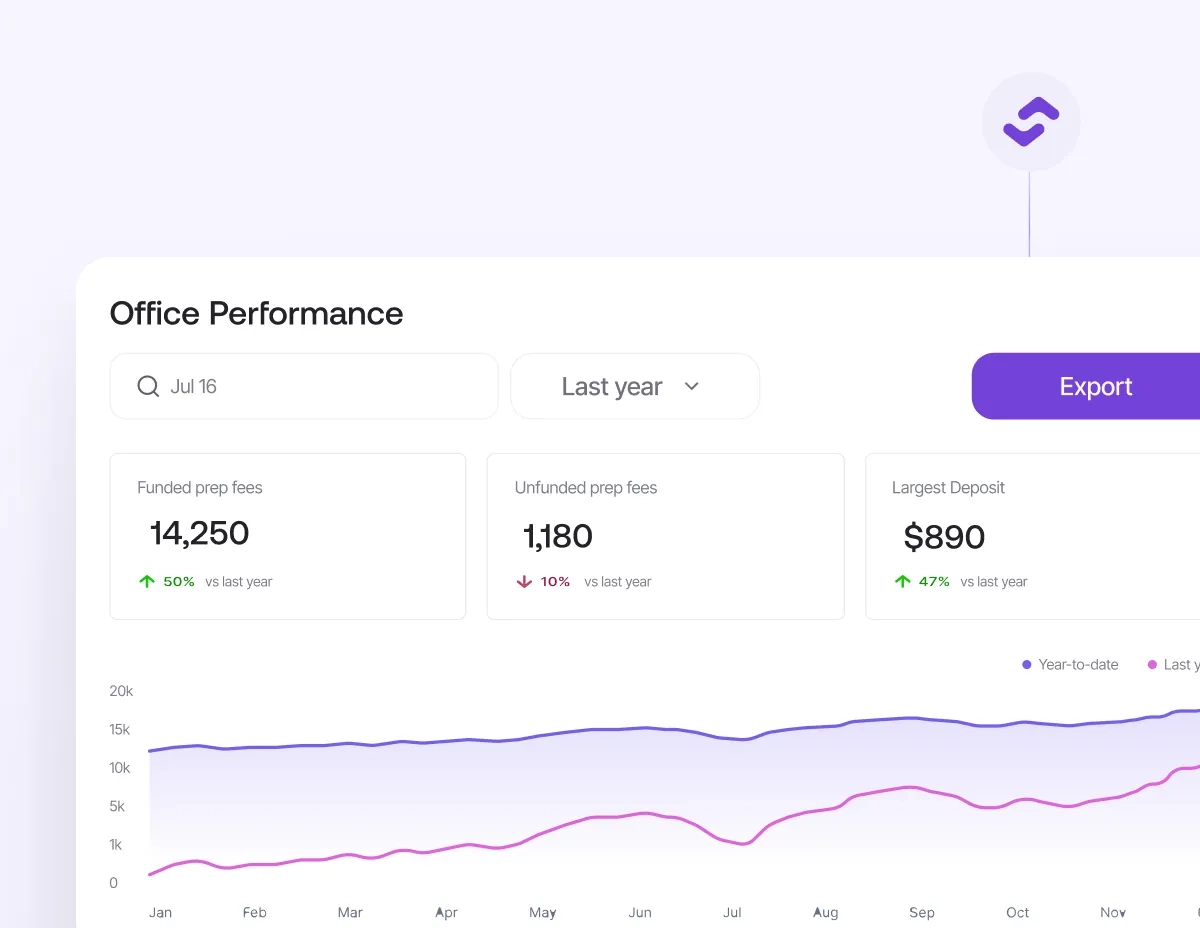
Office performance metrics on funded fees, unfunded fees, and deposits for strategic decision-making.
Insights into office performance

Quickly reference your office performance with detailed reports that show what’s working and where there’s room for improvement.

Purple checkmark icon used for bullet points on the website.
Access detailed insights into key performance metrics to understand your office’s strengths.
Purple checkmark icon used for bullet points on the website.
Pinpoint areas for growth and optimize your processes to enhance efficiency.
Purple checkmark icon used for bullet points on the website.
Use performance data to make informed, strategic decisions for your tax business.
Service Bureau detailed reports

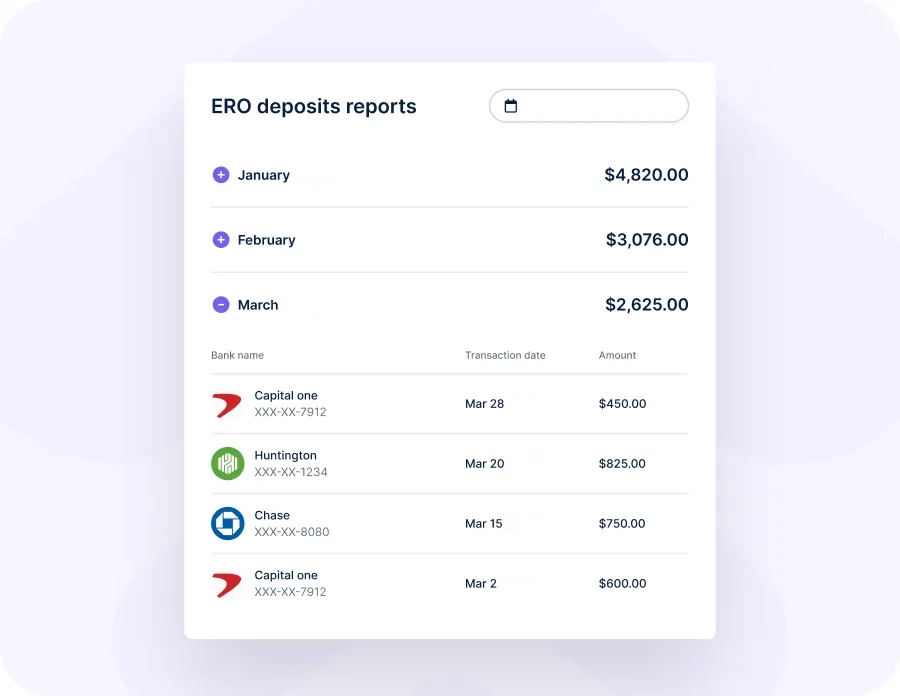
Access in-depth analytics for each of your sub-offices to get a clear picture of their individual performance and ensure they’re operating at their full potential.
Purple checkmark icon used for bullet points on the website.
Drill down into specific data for each office to understand their individual progress and challenges.
Purple checkmark icon used for bullet points on the website.
Tailor your reports to focus on key metrics that matter most to your sub-offices’ success.
Purple checkmark icon used for bullet points on the website.
Use detailed reports to provide targeted support and improvements for each office’s unique needs.
Service Bureau deposit reports displaying monthly totals and detailed transactions.

Discover Even More

Order supplies within the Refundo Dashboard.
Order supplies for all your offices
Streamline the process of ordering supplies by doing it for them and ensure your offices receive all the supplies they need on time and without any issues.
Smiling woman with curly hair wearing a black shirt showing a thumbs-up gesture indoors.
Manage your Service Bureau effectively
As a service bureau, you will have complete access to user permissions, your fee setup and many other ways to effectively manage your business.
Smiling businessman in suit stretching with raised arms at his office desk.
PTIN Pay automates preparer payroll. Just 2.99% per transaction.
Pay your PTIN preparers by a set amount or percentage, no manual calculations, no hassle. Quick setup, live reporting, and one less thing on your plate.
Smiling man in a blazer standing outdoors, looking at his smartphone with sunlight reflecting on the screen.
RPay Refunds, up to 5 days early. Just $20.
Direct deposit or check, RPay gets your clients their money faster. Works with most integrated tax software partners.
Get Started

Frequently Asked Questions

How can I use the detailed reports to improve my office performance?
Close questionOpen question

Detailed reports provide insights into key performance metrics, allowing you to identify strengths and areas for improvement.

What information can I find in the Service Bureau Detailed Reports?
Close questionOpen question

You can access in-depth analytics for each of your sub-offices, including individual performance data and key metrics. These reports help you understand each office's progress, challenges, and overall performance, enabling you to provide targeted support and implement necessary improvements.

How can I tailor fee splits to match each office's performance?
Close questionOpen question

You can customize fee splits based on the performance and needs of each sub-office by setting percentages or specific dollar amounts. This flexibility allows you to align fee structures with the performance levels and financial contributions of each office, ensuring fair compensation and optimized revenue distribution.

How can the Service Bureau tools help me manage and support my sub-offices more effectively?
Close questionOpen question

The Service Bureau tools allow you to track performance, adjust fee splits, and manage operations seamlessly. By using detailed analytics and customizable fee structures, you can provide targeted support, streamline processes, and ensure that each sub-office operates efficiently and meets its full potential.


Frequently asked questions about banking services for tax professionals.Frequently asked questions about banking services for tax professionals
Tax professionals partnering with Refundo to grow their business
Ready to grow your tax business?
Schedule a demo today and join the thousands of tax professionals already using our tools.
Thank you! Your submission has been received!
Oops! Something went wrong while submitting the form.
TaxSlayer Logo
OLTpro Logo
ATX Logo
Crosslink Logo
RushTax Logo
MyTAXPrepOffice Logo
nLync Logo
DrakeSoftware Logo
TaxWise Logo
Refundo arrow design representing tax business growth